Adding relatives
Growing a tree means adding people and wiring up the families that connect them. In GEDCOM that’s
two jobs — creating an individual record and creating the family links (FAMC, FAMS) that tie
parents, spouses, and children together. Linea Codex does both in one step: pick a relationship, and
the new person arrives already linked into the right family.
Adding a brand-new record
Section titled “Adding a brand-new record”To create a record from scratch, use Add Record (in the Edit menu, and as a split button in the toolbar). You choose what kind:
- INDI – Person
- FAM – Family
- SOUR – Source
- NOTE – Note
- OBJE – Multimedia
- REPO – Repository
- SUBM – Submitter
A new tab opens with a small starter record ready to fill in. Adding a blank record has a shortcut: Ctrl+N (Cmd+Ctrl+N on macOS).
Adding a relative of the selected person
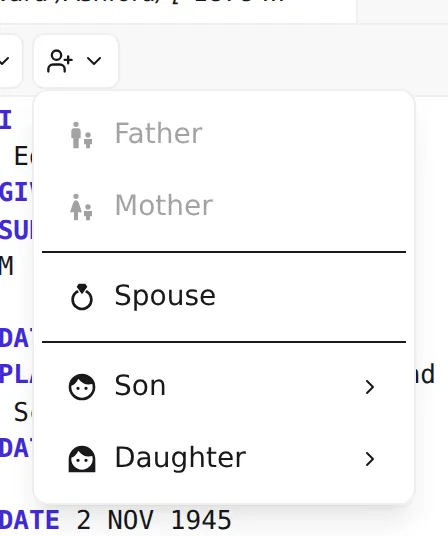
Section titled “Adding a relative of the selected person”Select a person and use Add relative (the split button beside Add Record in the toolbar). Choose the relationship and Linea Codex creates the new individual and the family links for you:
| Choose | What you get |
|---|---|
| Father | A new male individual set as this person’s father, linked through their family. |
| Mother | A new female individual set as this person’s mother. |
| Spouse | A new partner, with a new family joining the two of them. |
| Son | A new son. |
| Daughter | A new daughter. |
For sons and daughters, if the selected person already has more than one spouse you’ll be asked which family the child belongs to — pick a spouse, or (no other parent) to record the child without a second parent. Parent slots that are already filled (a father who’s recorded, say) are greyed out so you don’t create a duplicate.
How it works
Section titled “How it works”There’s no form to fill in. Choosing a relationship opens the new person in the editor as a small starter record with the cursor already parked in the name field. Type the name, add whatever else you know, and apply your changes — see Apply, discard & undo.
Behind that single action, Linea Codex:
- creates the new individual record,
- creates the connecting family record if one is needed (or reuses an existing family — for example, a second child joins the same family as the first), and
- writes the cross-reference links on both sides so the relationship is complete and valid.
Once you apply, selection moves to the new person — so adding three children in a row means: add, name, apply; the new child is now selected, ready for their details. (Adding a relative keeps you focused on that new record until you’ve applied or discarded it; see Apply, discard & undo.)
Beyond the basics
Section titled “Beyond the basics”The five relationships above cover ordinary parent–child and spouse links. Genealogy is rarely that tidy — adoptions, step-parents, foster relationships, and unmarried partners all have their own GEDCOM patterns. Those are covered as recipes in the cookbook:
- Relationships recipes — adoption, fostering, multiple parents, and more.
Next: keep your file clean as it grows — Validation: reading, fixing, silencing →.