Converting GEDCOM versions
GEDCOM comes in versions — 5.5, 5.5.1, and 7.0 — and they differ in real ways: how media is stored, how dates and notes are structured, which tags exist. Linea Codex can move your project from one version to another, reshaping the data so it stays faithful and valid. This is conversion, and it’s deliberately different from simply relabelling the version number.
Convert: reshape the data
Section titled “Convert: reshape the data”Open File → Convert version and pick a target — GEDCOM 5.5, GEDCOM 5.5.1, or GEDCOM 7.0 (your current version isn’t offered). Conversion always goes through a common, version-neutral model rather than translating directly between two specific versions — the same path whichever direction you go, which keeps results consistent. (Why a common model? See The version-independent model.)
Conversion happens in two acts, so nothing changes until you say so:
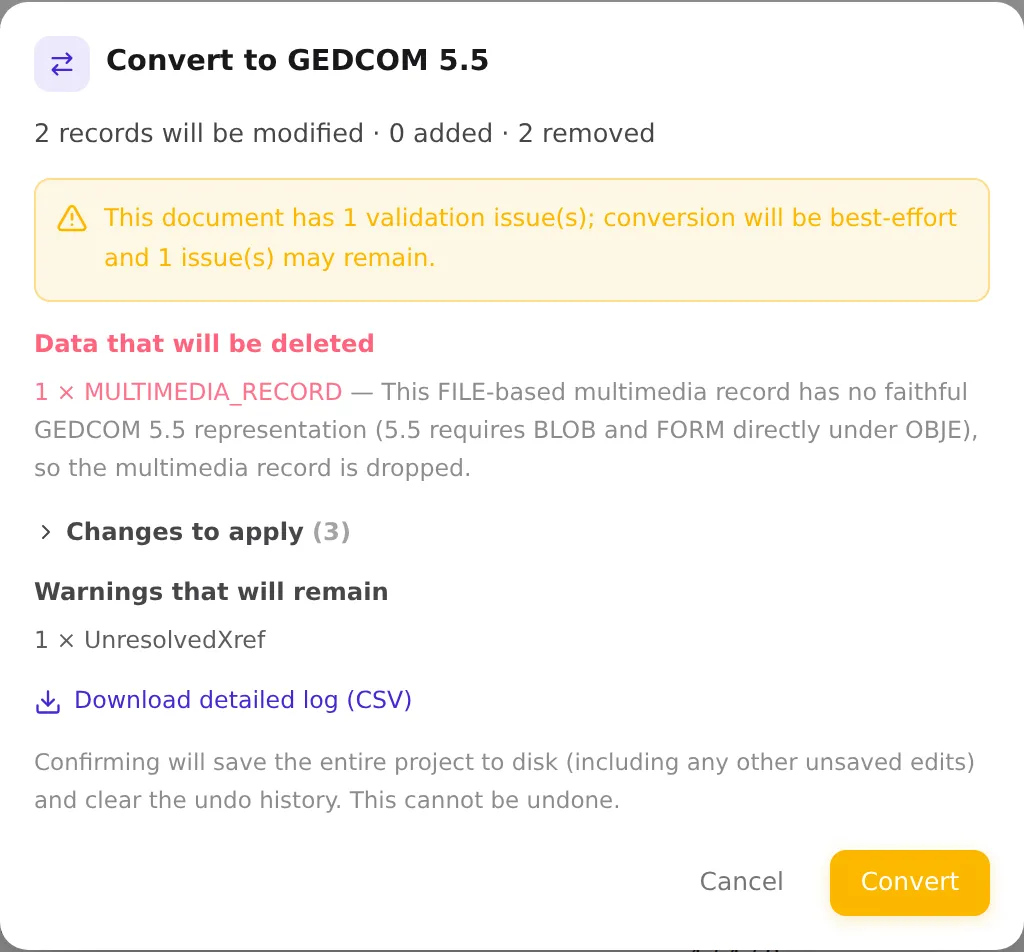
- Preview. Linea Codex analyses the conversion (Analyzing conversion…) and shows you exactly
what would happen:
- Totals — how many records will be modified, added, and removed.
- Data that will be deleted — anything in your file that has no faithful representation in the target version, called out prominently.
- Changes to apply — the non-destructive reshaping (collapsed by default; expand to read it).
- Warnings that will remain — issues that survive into the converted file.
- Confirm. Press Convert to apply, or Cancel to back out. Confirming saves the whole project to disk and clears the undo history — it can’t be undone, so review the preview first.
If you want the details on paper, you can download a full conversion log (a CSV listing every change) from the preview.
Compliant in, compliant out
Section titled “Compliant in, compliant out”Linea Codex never blocks a conversion because your file has validation problems. If the source has issues, conversion proceeds on a best-effort basis and tells you so — a banner notes how many issues exist and how many may remain afterward. The promise is simple: a clean, compliant file in yields a clean, compliant file out; a messy file is converted as faithfully as possible, with the remaining problems surfaced rather than hidden.
What actually changes between versions
Section titled “What actually changes between versions”The converter handles the version-specific differences for you. Common examples:
- Media. Upgrading toward 7.0, embedded media is saved out as external files; downgrading to 5.5, external files are re-embedded back into the document. If a 7.0 record references several files where an older version allows only one, the surplus references are dropped — and the preview says so.
- Notes, tags, and codes are remapped to their counterparts in the target version (for instance, media format codes ↔ MIME types).
- Encoding. GEDCOM 7.0 requires UTF-8, so converting to 7.0 ensures a compatible encoding. You don’t have to manage this by hand — see Encoding & ANSEL for the details.
For a side-by-side of what each version supports, see the versions & conversion matrix.
Relabel: change only the version number
Section titled “Relabel: change only the version number”Sometimes you just want to declare a different version without rewriting any data — for example, a
file authored as 5.5 that is actually already 5.5.1-shaped. To do that, edit the version directly in
the header (HEAD → GEDC → VERS) in the editor and save. Linea Codex recognises this and asks you
to confirm a relabel:
Change declared GEDCOM version? … This is a relabel only — the document data is not being converted. Validation rules and version-specific features will switch to the new version’s rules; existing data that doesn’t fit those rules will surface as validation diagnostics.
Confirm with Save and relabel. Like conversion, a relabel saves the project and clears the undo history; to revert, relabel back to the original version.
Because the data isn’t reshaped, anything that only exists in the old version’s shape will now show up in the validation panel under the new version’s rules. That’s the signal that you wanted a conversion, not a relabel.
Which one do I want?
Section titled “Which one do I want?”| Relabel | Convert | |
|---|---|---|
| What changes | Only the declared version number | The actual data, reshaped for the target version |
| How you trigger it | Edit HEAD → GEDC → VERS and save | File → Convert version |
| Media, tags, encoding | Untouched | Migrated to fit the target version |
| When to use it | The data already fits; you’re just correcting the label | You’re genuinely moving between versions |
| Undo | Cleared (relabel back to revert) | Cleared (review the preview first) |
Next: when your file is in the version and shape you want, save and export it →.