The date editor
GEDCOM dates have their own little grammar — 15 MAR 1850, ABT 1850, BET 1840 AND 1850,
FROM 1838 TO 1841, calendars other than Gregorian, and more. You don’t have to remember that syntax.
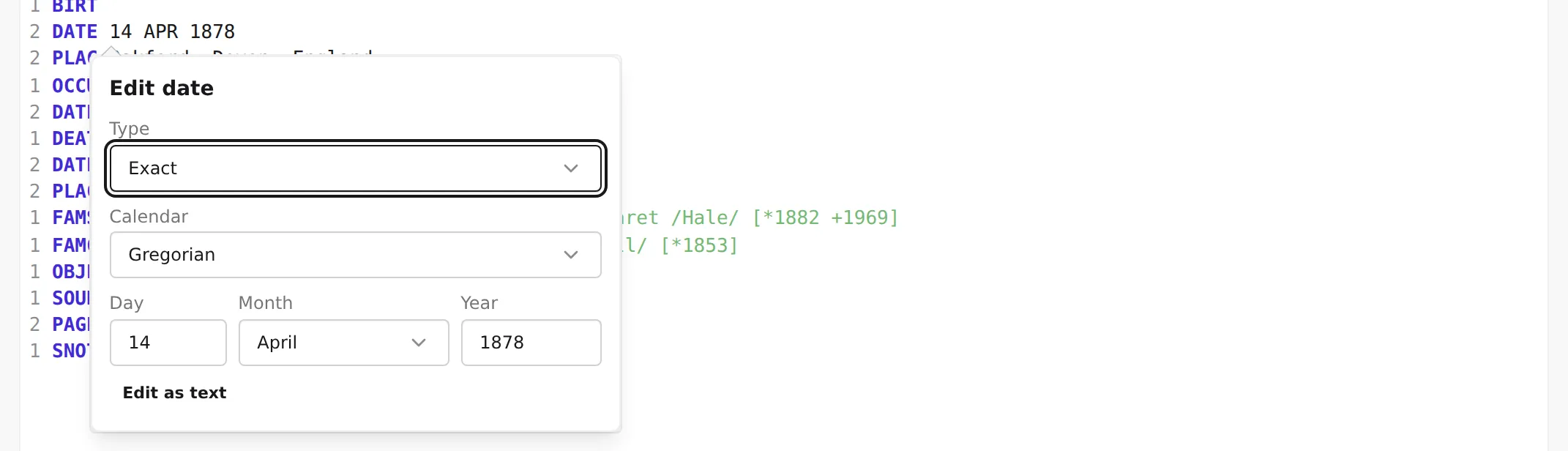
Put the cursor on a DATE line and a small date editor opens, with fields for the parts of a date
and a menu of the kinds GEDCOM allows. Fill it in and the editor writes the correct value for you.
Opening it
Section titled “Opening it”Put the cursor anywhere on a line whose tag is DATE, then press Ctrl+Space (the
same on macOS and Windows / Linux). The editor opens right at the date. On any other line that same
shortcut summons autocomplete instead — only a DATE line gets the
date editor.
It works whether the date is already written or the line is empty (2 DATE with nothing after it), and
in both structured and raw modes. Press Esc to close it.
The fields
Section titled “The fields”At the top is a Type menu — the kind of date you’re recording. Pick the type and the editor shows just the fields that type needs:
- Exact — a single date. Fill in Day, Month, and Year (day and month are optional — Year on its own is a valid date, and a year-and-month with no day is fine too).
- About, Calculated, Estimated — an approximate single date, qualified as
ABT,CAL, orEST. Same Day / Month / Year fields. - Before, After — an open-ended range (
BEF/AFT): one date that the event happened before, or after. - Between — a closed range (
BET … AND …): a From date and a To date. - From, To — an open-ended period (
FROM/TO). - From and to — a closed period (
FROM … TO …): a From date and a To date. - Interpreted — a date you’ve interpreted from some other wording: the date plus a Phrase that records the original.
- Phrase — free text for a date that can’t be expressed as a calendar date at all (
(stated as "Easter 1850")). You type the wording into the Text field.
A Calendar menu sits beneath the type, for date kinds that take a calendar date.
The editor won’t write an incomplete value: a date needs at least its Year, a day can’t be entered without a month, and the interpreted/phrase types need their text. Fields it isn’t happy with are marked, and the line is only updated once the date is well-formed.
When a date doesn’t fit the form
Section titled “When a date doesn’t fit the form”Some real dates are more unusual than the form’s fields can express. When that happens the editor opens in its text mode instead — a single Raw value field with the note This date cannot be edited with the form. Edit the text directly. — so you can type the value by hand and still keep the rest of the editing flow.
You can move between the two at any time with the Edit as text button. Switching to text shows the current value as raw GEDCOM; switching back to the form only succeeds if what you’ve typed is a date the form can represent — if it isn’t, the field is flagged and you stay in text mode.
Next: see who a cross-reference points to without leaving the line — Cross-reference hints →.