The Inspector and its tabs
The Inspector is a calm, read-only view of whatever record you have selected. Where the editor shows the raw GEDCOM lines, the Inspector turns the same record into a tidy, structured summary — a person’s name, dates, and family in plain language; a source’s citations; a note’s text — organised into tabs along a slim icon rail. It follows your selection in the tree automatically: click a record, and the Inspector re-shapes itself to fit.
The Inspector sits at the bottom of the workspace, below the editor and beside the validation panel. Show or hide it with the Inspector toggle in the footer.
The tab rail
Section titled “The tab rail”A vertical rail of icons runs down the left edge of the Inspector. Each icon is a tab; hover one to see its name. Which tabs appear depends on the kind of record you’ve selected — a person, a family, a source, and so on each get a tab set suited to them. The Inspector remembers which tab you last used per record kind, so if you always check References on people, that’s the tab you’ll land on the next time you select one.
Here is the full inventory, by record kind:
| Record kind | Tabs |
|---|---|
Person (INDI) | General · Events · Family · Sources · Media · Notes · References |
Family (FAM) | General · Events · Children · Sources · Media · Notes · References |
Source (SOUR) | General · Citations · Media · Notes |
Note (NOTE) | General · References |
Multimedia (OBJE) | General · Preview · Notes · References |
Repository (REPO) | General · Sources held · Notes |
Submitter (SUBM) | General · Notes · References |
A few highlights:
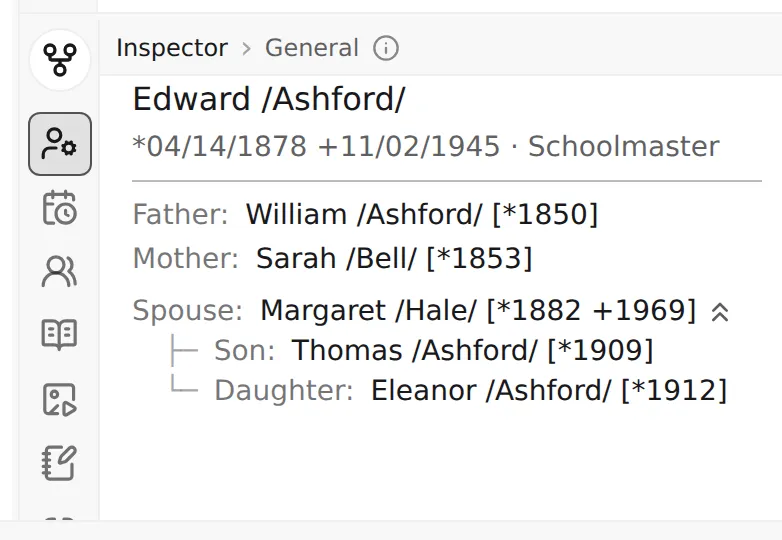
- General is the home tab for every record. For a person it shows the name, birth/death dates, occupation, a photo thumbnail when one is attached, and the immediate family — parents, spouse, and children — as clickable names (see Following links below).
- Events lists life events (birth, marriage, death, and the rest) in order; Family and Children lay out relationships.
- Sources and Citations surface the evidence behind a record; Media and Preview show attached images; Notes gathers the prose.
- References is the reverse-lookup tab — what points here (covered below).
The tree overview (the header record)
Section titled “The tree overview (the header record)”When nothing is selected — or when you select the file’s header (HEAD) record — the Inspector
shows a Tree overview instead of a tab rail: a one-screen snapshot of the whole project. It’s a
short list of statistics, each a single line:
- Persons — how many individuals are in the file.
- Sex (M / F / U) — the male / female / unknown split.
- Note coverage and Source coverage — what share of people carry at least one note or source, as a percentage with the raw counts.
- Most common surname — the top surname and how many people share it.
- Time span — the earliest and latest years found in the file’s dates.
- Longest lineage — the deepest unbroken parent-to-child chain, counted in generations.
The numbers update on their own as you edit — delete a person and the Persons count drops without a refresh. A few rows are computed lazily and briefly show a loading mark while they catch up.
Following links
Section titled “Following links”The Inspector isn’t just a read-out — it’s a way to travel through your tree. Wherever it shows a related person — a parent or child on the General tab, a subject on an event — that name is a link. Click it and Linea Codex selects that person, moving the whole workspace (tree, editor, and the Inspector itself) onto them. The Inspector re-shapes to the new record’s tabs as it goes.
This makes the Inspector a natural companion to navigation: open a person, click their father, then his mother, and walk back up a line without ever touching the tree. On a person’s General tab, small chevron icons beside a relative’s name hint that there are more ancestors or descendants of theirs not shown here — a cue that following the link will reveal more.
References: what points here
Section titled “References: what points here”Every other tab answers what does this record contain? The References tab answers the opposite — what in this file points at this record? It’s a reverse lookup of every inbound cross-reference, grouped by the kind of record doing the pointing and labelled with the path it came through.
For a person, that’s typically the families they belong to — you’ll see a FAM group with rows like
via HUSB or via CHIL, telling you exactly how each family references them. Click any row to jump
to that record. The list stays live: add a new citation to a source somewhere in the file and the
source’s matching tab updates its count on its own.
The same reverse-lookup machinery powers the kind-specific variants:
- Citations (on a source) — every record that cites this source. Empty-state: Nothing cites this source.
- Sources held (on a repository) — every source that names this repository.
- References (on people, families, notes, media, submitters) — the general case. Empty-state: Nothing in this file references this record.